
If you have just hit send and are staring at a wallet that says "pending", here is the honest answer. Typically, a Bitcoin transaction completes within 10 minutes to an hour, based on block processing time. The first confirmation usually lands within about 10 minutes, and the 6 confirmations that most services treat as final take roughly 60 minutes on average.
That is the normal case. The speed of any individual transaction depends on two things: how busy the network is and how much fee you attached. When the network is quiet and your fee is reasonable, you will see a confirmation in the next block or two. When the mempool is crowded and your fee is low, the same transaction can sit for hours and, in rare cases, days.
This guide covers what those numbers mean in practice, what exchanges wait for, why a transaction gets stuck, and what you can do about it.
How long does a Bitcoin transaction take?
A Bitcoin transaction takes about 10 minutes to get its first confirmation and about an hour to reach 6 confirmations, which is the point most exchanges and merchants consider it settled. Your transaction shows up on the network within seconds of being broadcast, but "showing up" and "confirmed" are different things.
In between, your wallet broadcasts the signed transaction to Bitcoin nodes, which place it in the mempool, a waiting room for transactions not yet written into a block. Roughly every 10 minutes a miner adds the next block to the blockchain. If your transaction is in that block, it has 1 confirmation, and every block mined after it adds another.
| Confirmations | Typical time | What it means in practice |
|---|---|---|
| 0 (unconfirmed) | Seconds after sending | Visible in the mempool and in the recipient's wallet as pending. Not final; can still be replaced or dropped. |
| 1 | About 10 minutes | Included in a block. Fine for small payments between individuals. |
| 2 | About 20 minutes | Reversal would require re-mining two blocks, which is already very unlikely. |
| 3 | About 30 minutes | A common threshold for exchange deposits and mid-sized payments. |
| 6 | About 60 minutes | The traditional standard for finality, used by many exchanges, custodians and merchants for larger amounts. |
These are averages. Bitcoin's 10-minute block time is a statistical target, not a schedule. Two blocks can arrive a minute apart and then nothing for 40 minutes. If your third confirmation seems to be taking forever, that is usually just variance in block times.
What exchanges typically require
Exchanges set their own confirmation requirements for Bitcoin deposits, and they range from 1 to 6. Three confirmations, about 30 minutes, is a common middle ground; some platforms credit a deposit after 1 or 2 but do not let you withdraw until more have arrived, and others hold out for the full 6. The requirement is usually printed on the deposit page next to the address. If you are choosing where to send, our review of Kraken's security covers how one major exchange handles deposits and custody.
Why is my Bitcoin transaction taking so long?
Almost always because the network is busy and your fee is low. Miners choose transactions from the mempool based on fee amount, transaction size and age, so when demand for block space exceeds supply, the lowest-paying transactions wait the longest. Everything else on this list is a variation on that theme.
Network congestion and the mempool
Imagine a highway during rush hour. The more cars there are, the slower the traffic. The Bitcoin network is not much different. Each block has limited space, and when more transactions are broadcast than blocks can absorb, the backlog builds in the mempool. Congestion typically follows surges in Bitcoin's popularity, such as price rallies or new token protocols built on Bitcoin. When the mempool is full, users experience slower confirmation times and need to pay higher fees to get through.
The average time to reach the standard 6 confirmations is about 60 minutes, but during periods of high network activity this can extend to well over an hour. In extreme congestion, delays can range from a few minutes to a few days for transactions that paid the minimum fee.
Transaction fees
Consider transaction fees as the toll on a freeway. When the network is congested, users can opt to pay a higher fee, which is like paying for an express lane to expedite confirmation. Fees are priced in satoshis per virtual byte (sat/vB), so what matters is not the total fee but the fee per unit of block space your transaction occupies. A transaction with many inputs takes more space and needs a higher total fee to achieve the same fee rate.
Does that mean low-fee transactions are doomed to a snail's pace? Not necessarily. Higher fees incentivise miners to prioritise certain transactions, but if the network is quiet, a modest fee confirms just as fast. The skill is in balancing the urgency of the transaction against your willingness to pay. Most wallets offer "fast", "medium" and "slow" fee options based on the current state of the mempool.
Replace-by-fee (RBF)
Replace-by-fee lets the sender rebroadcast a pending transaction with a higher fee, and the new version replaces the old one in the mempool. It is the cleanest way to unstick a transaction you sent yourself, but it only works if your wallet supports it and, often, only if the original was flagged as replaceable when sent. A "bump fee" or "speed up" button next to a pending transaction is RBF.
Child-pays-for-parent (CPFP)
Child-pays-for-parent works from the other direction. If you are the recipient, or you sent a transaction with change coming back to you, you can spend the unconfirmed output in a new transaction with a generous fee. Miners evaluate parent and child together, so the high-fee child drags the low-fee parent into the block. CPFP is the tool for a stuck incoming transaction when the sender is unresponsive.
How long does Bitcoin take to send between exchanges?
Sending Bitcoin from one exchange to another usually takes 30 minutes to two hours from the moment you click withdraw, and the on-chain part is often the shortest piece. An exchange-to-exchange transfer has three stages, and each adds time.
- Withdrawal processing at the sending exchange. Exchanges batch withdrawals, run security checks, and sometimes hold a request for manual review, especially for new accounts, large amounts or a recently changed password. This can take a minute or several hours, and nothing appears on the blockchain until it is done. If your withdrawal status says "processing" rather than "sent", the delay is here.
- On-chain confirmation. Once the exchange broadcasts the transaction, the normal timings apply: about 10 minutes per confirmation. Exchanges generally pay a sensible fee, but during congestion even they can lag.
- Deposit crediting at the receiving exchange. The receiving platform waits for its required confirmations, then credits your account. Some credit after 1 to 3 confirmations, others after 6.
Two shortcuts: transfers between accounts on the same exchange are usually instant and free because they are an internal ledger update, and a growing number of exchanges support Lightning withdrawals and deposits, which settle in seconds.
How long does it take to receive Bitcoin?
You will see incoming Bitcoin in your wallet within seconds of the sender broadcasting it, marked as pending or unconfirmed, and it becomes spendable after the first confirmation in about 10 minutes. Whether you should treat it as yours at that point depends on the amount and who sent it.
For a payment from someone you trust, 1 confirmation is plenty. For a payment from a stranger, especially for goods you are handing over, wait for more. An unconfirmed transaction can be replaced by the sender with one that sends the coins elsewhere, which is exactly what RBF allows, so zero-confirmation payments should never be treated as final. After 1 confirmation it cannot be replaced.
If you are receiving to your own wallet and nothing shows after a few minutes, the usual explanation is that the sender has not actually broadcast yet, or sent to a different address than the one you gave them. Confirm the address with them directly; our guide to what a BTC wallet address is explains the formats you will see.
How to speed up a stuck Bitcoin transaction
If a transaction is stuck, you have four realistic options: bump the fee with RBF, pull it through with CPFP, use a transaction accelerator, or wait.
- Bump the fee with RBF. Open the pending transaction in the wallet that sent it and look for "increase fee" or "speed up". Set the new fee at or above the rate currently getting into the next block. The replaced transaction disappears from the mempool once the new one propagates.
- Use CPFP. If RBF is not available, or you are the recipient, spend the unconfirmed output back to yourself with a fee high enough to cover both transactions. Wallets that support coin control make this straightforward.
- Try a transaction accelerator. Some mining pools will include a specific transaction in their next block, sometimes for a fee. Check reviews, and never use one that asks for your private keys or seed phrase.
- Wait it out. Congestion clears, usually within hours and almost always within days. Most nodes drop transactions that have not confirmed after around two weeks, at which point the coins simply reappear in the sending wallet. Nothing is lost by waiting; the coins are either confirmed or still yours.
Avoiding the problem next time
- Check the mempool before you send. Monitoring tools show current congestion and the fee rate needed for the next block. Bitquery's Coinpath, for instance, traces money flow and account balances on the blockchain, and block explorers show confirmation counts and estimated confirmation times. This data helps you plan when to send and how much it will cost.
- Send during off-peak hours. Fewer competing transactions means faster processing and lower fees. Weekends and overnight hours in US and European time zones are often quieter.
- Use SegWit addresses. Segregated Witness transactions take up less block space, so they cost less at the same fee rate. Addresses starting with "bc1" are SegWit.
- Use Lightning for anything time-sensitive. More on that next.
Lightning Network: near-instant Bitcoin payments
The Lightning Network is a Layer 2 built on top of Bitcoin that settles payments in seconds for fees of a fraction of a cent, and it is the standard answer for anyone who finds on-chain confirmation times too slow. Rather than writing every payment to the blockchain, the Lightning Network creates off-chain payment channels between participants. Opening a channel is an on-chain transaction that takes the usual 10 minutes to an hour; once open, any number of payments can flow through it instantly.
This off-chain approach means Bitcoin micropayments conducted through Lightning lead to less congestion on the main chain and lower transaction costs for everyone. Under the hood, Lightning uses hashed timelock contracts (HTLCs) to make multi-party payments secure: a payment routed through several intermediaries either completes end to end or fails entirely, and nobody along the route can take the funds.
The trade-off: Lightning wallets are either custodial, where a company holds the keys, or non-custodial, where you manage channels and liquidity yourself. Lightning is ideal for small and medium payments and for moving funds between exchanges that support it. For large transfers to cold storage, an on-chain transaction remains the right tool, and an hour's wait is a fair price for that level of security.
Protecting your funds during transfer
A Bitcoin transaction cannot be reversed once confirmed, so making sure it reaches the right place matters more than how fast it gets there. The private key is what signs a transaction and proves ownership of the funds, so securing and saving your keys, with at least two copies stored separately, is the foundation of everything else.
When you send, a short routine prevents most of the losses we hear about:
- Use a hardware wallet for meaningful amounts. It keeps private keys offline, which removes most malware and remote-access risk. Our Trezor vs Ledger comparison covers the two most common choices.
- Double-check the address before sending. Compare the first and last several characters against the source, and be alert to clipboard malware that swaps a pasted address for the attacker's.
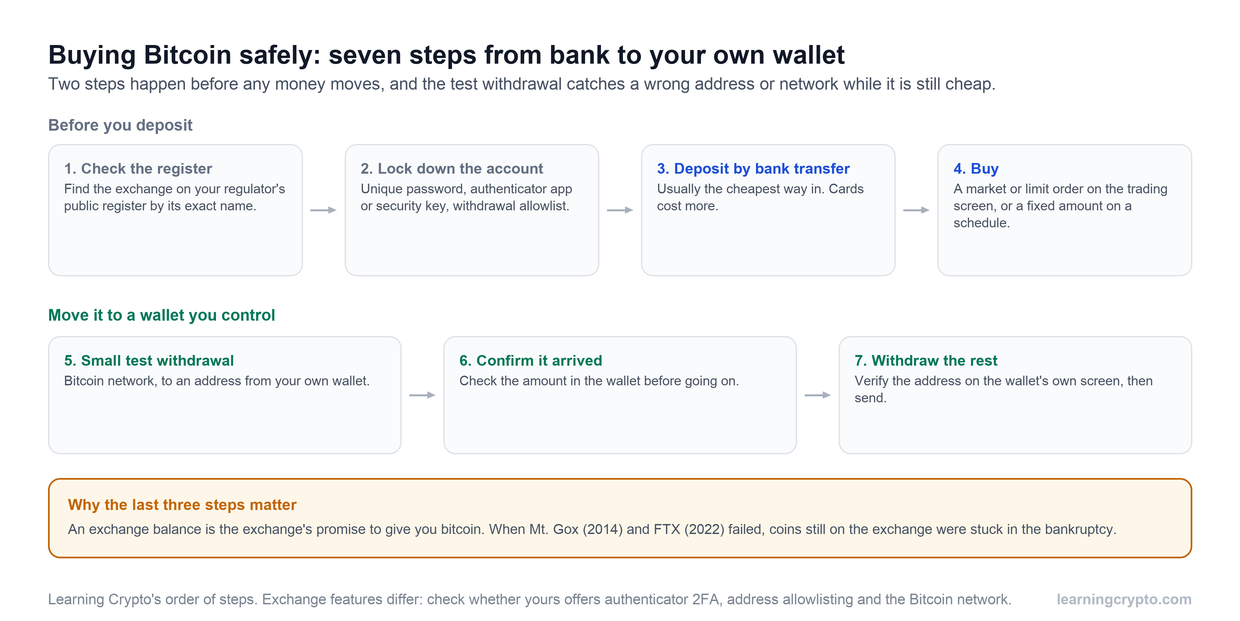
- Send a small test transaction first for any new address or large amount. The extra 10 minutes is cheap insurance.
- Enable two-factor authentication on any exchange or custodial wallet involved in the transfer.
For a step-by-step walkthrough of the sending process itself, see how to send Bitcoin to another wallet.
Frequently asked questions
How long does it take to send Bitcoin to another wallet?
Usually 10 minutes to an hour. The transaction appears in the receiving wallet within seconds as unconfirmed, gets its first confirmation in about 10 minutes, and reaches the 6 confirmations most people consider final in about 60 minutes. A low fee during congestion can stretch that to hours; Lightning transfers settle in seconds.
How many confirmations does a Bitcoin transaction need?
A Bitcoin transaction generally needs 6 confirmations to be considered fully processed. The first confirmation happens when a miner includes your transaction in a block; each block added after that counts as another confirmation. Reaching 6 takes roughly 60 minutes under normal conditions, which is why many exchanges and services wait that long before treating a deposit as final.
How long can an unconfirmed Bitcoin transaction stay pending?
Anywhere from a few minutes to a few days, depending on the fee and the backlog. Most nodes purge a transaction from the mempool if it has not confirmed after roughly two weeks, after which the coins show up in the sender's wallet again. If you want it confirmed sooner, bump the fee with RBF or use CPFP rather than waiting for the purge.
How long does it take to transfer crypto to a wallet if it is not Bitcoin?
Every blockchain has its own block time. Ethereum blocks arrive roughly every 12 seconds and Litecoin targets 2.5 minutes, so those transfers are typically faster than Bitcoin, though exchanges still impose their own confirmation requirements. As with Bitcoin, the slowest step is often the exchange's withdrawal processing rather than the chain itself.
Is there a cheaper or faster time of day to send Bitcoin?
Yes. Congestion comes from a high volume of transactions waiting to be confirmed, often during surges in interest. Sending during off-peak hours, when fewer transactions compete for block space, usually means faster processing and lower fees. Keep enough balance to cover a higher fee if you cannot wait, and double-check the address before you send, since transactions cannot be reversed.
How can I track a Bitcoin transaction while it is pending?
Paste the transaction ID into a block explorer. It shows whether the network has seen the transaction, how many confirmations it has, the fee rate it paid and an estimate of when it will confirm. Some tools, such as Bitquery's Coinpath, also trace money flow and balances on-chain, and display current congestion and fee levels so you can decide when to send and how much fee to attach.
This guide is part of stage 2 of 8, how bitcoin works, in the free Learning Crypto curriculum. Next: Crypto wallets for beginners.
Keep learning
- How to Send Bitcoin to Another Wallet: A Step-by-Step Guide
- What Is a BTC Wallet Address?
- 8 Best Crypto Movies to Watch
- More guides in the Bitcoin hub
- Members: Satoshi Indicator, a daily Bitcoin DCA signal for members