Is MetaMask Safe? Risks and Best Practices for Security
TL;DR MetaMask is a secure, open-source wallet software with extensive security audits, but using it safely in the Web3 ecosystem requires constant vigilance and strict security practices.
MetaMask is the front door to Web3. With over 30 million monthly active users, it serves as the default gateway to DeFi, NFTs, DAOs, and dApps across multiple blockchains. If you’re doing anything on Ethereum or its layer-2s, chances are, MetaMask is involved.
MetaMask is the most trusted wallet in crypto, yet people still lose funds using it every single day. This isn't a contradiction.
So, what’s going on then?
MetaMask is well-built. It’s open-source, non-custodial, and has been audited by top security firms. It doesn’t hold your funds, and it doesn’t store your keys. By design, it puts you in control. But with that control, one bad click, one fake site, one rushed approval, and it’s game over.
Its browser-based design offers convenience but also creates a huge attack surface. And since MetaMask is the most widely used wallet in DeFi, it’s also the most targeted by phishers, drainers, fake extensions, and sophisticated contract scams.
So let’s ask the real question:
Is MetaMask safe?
There are two different answers. The software? Yes, absolutely. Users who follow proper security practices? Also yes.
Users who treat it casually? Not even close.
What You’ll Learn
Why MetaMask is secure, but you still might lose everything
The real reason users get “hacked”
How to turn MetaMask from a soft target into a hardened vault
The risks of browser-based wallets and how to reduce your exposure
The exact settings, habits, and tools you need to use MetaMask safely
What Makes MetaMask Different (and Riskier)
MetaMask is much more than just another crypto wallet. It's a browser extension that doubles as a Web3 command center. That makes it incredibly powerful, but also uniquely exposed.
Browser Extension Architecture: Convenience Comes at a Cost
MetaMask lives where you browse: Chrome, Firefox, Brave, or Edge. The wallet is a browser extension that injects Web3 functionality directly into every website you visit. That's how you get those convenient one-click "Connect Wallet" buttons on Uniswap.
The core problem: Every website you visit is one step closer to your wallet. If your browser gets compromised, your MetaMask is compromised too. Browser security equals wallet security.
This is fundamentally different from standalone wallets like Exodus or mobile-only wallets like Trust Wallet. Those run in isolated processes, separated from your web browser. They don't see every website you visit or execute JavaScript from random sites. The attack surface is considerably smaller.
Browser extensions need extensive permissions to work:
Read and change data on websites
Access your browsing activity
Store data locally
These are legitimate requirements, but they also mean malicious extensions, clipboard hijackers, and fake popups can potentially piggyback on your browser activity.
You're using MetaMask in the wild, not in a fortress. That's the trade-off for instant dApp connectivity.
The DeFi Gateway Problem: Approval Fatigue Is Real
MetaMask is the primary gateway to Ethereum DeFi. Whether you're swapping on Uniswap, staking on Aave, or providing liquidity on Curve, you're probably doing it through MetaMask. That creates a specific problem: you're approving smart contracts constantly.
Here's what happens over time:
Week 1: You carefully read every approval. You check the contract address. You verify the amount.
Week 10: You see the MetaMask popup, recognize the interface, and click confirm. Muscle memory takes over.
Week 20: You've made hundreds of approvals. You have dozens of old permissions sitting there from protocols you used once six months ago. Each one is a potential vulnerability.
Attackers know this. They present malicious approvals that look identical to legitimate ones. The popup appears at the exact moment you expect it. The gas fee looks normal. You click confirm because that's what you always do, and suddenly, a contract has unlimited access to your tokens.
And because DeFi is permissionless, anyone can deploy any contract and ask you to interact with it. You're the only line of defense.
Phishing Campaign Prime Target: Everyone Wants Your MetaMask
MetaMask's popularity makes it the most impersonated wallet in crypto. And the attacks are sophisticated:
Cloned websites: Pixel-perfect copies of DeFi platforms using Unicode domains that look identical in your address bar.
Fake extensions: "MetaMask Plus" or "MetaMask Security" that occasionally slip into official extension stores.
Scam support: Someone claims to be MetaMask support on Twitter, Discord, or Telegram. MetaMask has no live support. If someone offers help via DM, it's a scam.
Ice phishing: You sign what looks like a harmless "wallet verification," but it's actually a setApprovalForAll message giving attackers control over your tokens.
Because MetaMask is so popular, every major phishing operation specifically targets it. Using a niche wallet means most attacks ignore you. Using MetaMask means you're in the crosshairs.
Open-Source: Strengths and Weaknesses
MetaMask's code is fully open on GitHub. Anyone can audit it, and security firms like Cure53 and Trail of Bits regularly do.
When vulnerabilities appear, they're patched quickly.
Why this matters:
Community trust through transparency
Vulnerabilities discovered and patched quickly
Bug bounty program pays up to $250,000 for findings
But…
Attackers study the code too, hunting for exploits
Fake MetaMask clones with backdoors appear regularly
Users assume "open-source" means "unhackable" (it doesn't)
Multi-Chain Complexity: More Networks, More Problems
MetaMask started as Ethereum-only. Now it supports 50+ blockchains through Snaps, including Polygon, Arbitrum, Optimism, Avalanche, BNB Chain, Solana, and Bitcoin.
Each additional chain introduces new risks:
Malicious custom networks that show fake balances or hijack transactions
Bridge exploits that can drain funds regardless of your wallet security
Network switching confusion (sending mainnet tokens to a Layer 2 address, for example)
Different security assumptions per chain
A phishing site might prompt you to "add Polygon," but actually add a fake network controlled by the attacker. Users approve transactions without noticing MetaMask switched networks mid-session.
More chains equals more moving parts. More moving parts equals more risk.
MetaMask's Unique Risk Profile | |||
|---|---|---|---|
Vulnerability Type | Risk Level | How It Compares | Primary Protection |
Browser-based attacks | High | Higher than standalone apps; lower than web wallets | Use dedicated browser profile; keep software updated |
Phishing susceptibility | Very High | Higher than all alternatives due to target size | Bookmark dApps; never trust search results or social media links |
Malicious approvals | Very High | Similar to all Web3 wallets; worse due to approval fatigue | Review every approval; use revoke.cash monthly; limit approval amounts |
Supply chain attacks | Medium | Similar to other open-source wallets | MetaMask uses LavaMoat sandboxing; keep extension updated |
Network confusion | Medium | Higher than single-chain wallets | Verify network before transactions; only add networks from official docs |
Fake extensions/apps | High | Higher than many hot wallets | Only install from official metamask.io or verified store listings |
Social engineering | Very High | Similar to all self-custody wallets | Never share seed phrase; ignore unsolicited "support" |
This might sound pretty grim. But millions use MetaMask without losing funds. The wallet works. You just need to know what you're up against.
MetaMask has built serious security features to counter these threats. The tools exist. Let's look at what MetaMask does right and how to actually use those protections.
MetaMask's Core Security Features
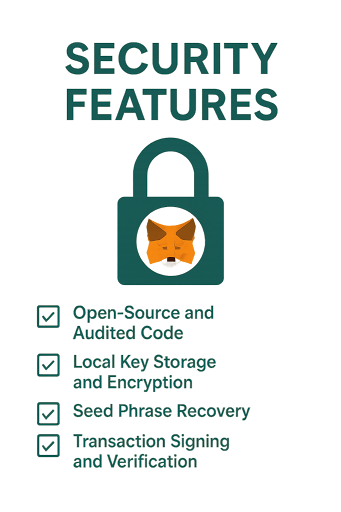
MetaMask gets attacked constantly because it's popular. But it's popular because the security foundation is solid. Here's what the wallet does right.
Open-Source and Audited Code
The full MetaMask codebase is on GitHub, where anyone can review it. Security researchers around the world constantly examine the code, looking for vulnerabilities before attackers find them.
The wallet has been audited multiple times by firms like Cure53 and Trail of Bits. ConsenSys runs a bug bounty program offering up to $250,000 for critical findings. When the "Demonic" vulnerability was discovered in 2022 (which could have exposed seed phrases under specific conditions), it came through the bug bounty and was patched before any exploits happened.
In 2025, Coinspect rated MetaMask the most secure wallet across all platforms. That's not marketing. That's independent evaluation of code quality, security features, and how the team responds to vulnerabilities.
Local Key Storage and Encryption
Your private keys never leave your device. MetaMask encrypts them with your password using AES encryption and stores them locally in your browser. The encryption key is derived from your password using PBKDF2, which makes brute-force attacks computationally expensive.
When you unlock MetaMask, it decrypts your keys into memory. When you lock it, they're encrypted again. At no point are your keys transmitted to ConsenSys servers or stored in the cloud.
This is true non-custodial security. Even ConsenSys cannot access your funds. But it also means if you lose your device and haven't backed up your seed phrase, your funds are gone permanently. No password reset option exists because there's no central server storing your keys.
Seed Phrase Recovery
MetaMask generates a 12-word BIP-39 recovery phrase when you create a wallet. Write it down, store it securely, and you can restore your wallet on any device, even if your computer explodes.
The seed phrase is your master key. Anyone who has it controls all your funds across all networks. That's why MetaMask never asks for it after initial setup, and why any website requesting your seed phrase is definitely a scam.
About 35% of MetaMask users skip backing up their seed phrase. They think they'll do it later and never do. Don't be that person. If your computer dies or you accidentally uninstall the extension, those funds are gone forever.
Transaction Signing and Verification
Every transaction requires explicit approval. MetaMask shows you the details before you sign:
Recipient address
Amount being sent
Gas fee
Transaction data
For smart contract interactions, MetaMask decodes the function being called into human-readable form. Recent versions label common functions like "Set Approval For All" or "Swap Exact Tokens For Tokens" so you understand what you're authorizing.
The wallet manages transaction nonces (sequence numbers) to prevent replay attacks. If a malicious site tries to get you to sign the same transaction twice, MetaMask blocks it.
For hardware wallet users, MetaMask acts as the interface while your Ledger or Trezor handles the actual signing. Private keys never touch your computer.
Phishing Detection and Security Alerts
In early 2024, MetaMask rolled out automatic security alerts powered by Blockaid. Every transaction gets simulated privately before you sign it. If the simulation detects something malicious (like you're about to send valuable tokens to an untrusted address or approve unlimited spending to a suspicious contract), MetaMask displays a warning.
The extension also maintains a blocklist of known phishing sites. Try to visit one and you'll see a red "Suspected phishing site" banner. This catches a lot of common scams, though new phishing operations appear faster than blocklists can update.
MetaMask acquired Wallet Guard in 2024, bringing additional anti-phishing technology in-house. The team actively hunts threats and publishes monthly security reports detailing the latest scams.
Hardware Wallet Integration
MetaMask supports Ledger, Trezor, Keystone, AirGap, Lattice, and other hardware wallets. Connect one, and MetaMask shows those accounts separately. Every transaction requires physical confirmation on the hardware device.
Your keys stay on the hardware wallet. MetaMask just provides the interface. Even if your computer has keyloggers or malware, attackers can't steal funds without physical access to your hardware device.
This is the single best security upgrade most MetaMask users can make. Hardware wallet integration gives you cold storage security with hot wallet convenience.
Read our comprehensive Guide on Hot vs Cold Wallets here
Network and dApp Connection Controls
When a website wants to connect to MetaMask, you must explicitly approve it. You'll see which account the site wants to access and what permissions it's requesting. You can reject suspicious requests or disconnect sites anytime.
Network switching requires confirmation. If you're on Ethereum mainnet and a site tries to switch you to another network, MetaMask asks for approval first. This prevents sites from silently changing your network.
Adding custom networks also requires approval. MetaMask shows you the network name, RPC URL, chain ID, and currency symbol before adding it. The wallet warns you to only add networks from official documentation.
MetaMask Snaps: Extensible Security
Snaps is a plugin system that lets you extend wallet functionality. Each Snap runs in a sandboxed environment and requires explicit approval to install.
Third-party developers have built security-focused Snaps that add extra confirmation steps for high-value transactions or flag contracts that don't match known safe patterns. This lets advanced users customize their security beyond MetaMask's defaults.
As of late 2025, over 73 Snaps are available from 60+ developers, with more than 1.1 million installations. Some add support for non-EVM chains, others provide enhanced transaction analysis.
MetaMask gives you strong tools. Whether those tools protect you depends entirely on whether you use them correctly.
The Real Threats MetaMask Users Face (and How to Defend Against Them)
MetaMask's code is solid. The attacks aren't breaking the wallet. They're breaking you.
Most "MetaMask hacks" follow the same pattern: a user approved something they shouldn't have. The wallet did exactly what it was told to do. Here are the actual threats that drain wallets, and what you can do about each one.
Smart Contract Approval Scams (Most Common)
How it works: A malicious dApp requests token approval. You see the MetaMask popup, the gas fee looks normal, you click confirm without reading the approval amount. The contract now has unlimited access to your tokens and can drain them whenever it wants.
Common scenarios: fake NFT mints, airdrop claims, "giveaway" sites, malicious DeFi protocol frontends.
Real example: BadgerDAO (December 2021). Attackers injected malicious code into the legitimate BadgerDAO frontend. Users visiting the real site were prompted to approve token spending to an attacker-controlled contract. $120 million stolen. The users trusted the site and approved without reading what they were signing.
Protection:
Review every approval amount. "Unlimited" or "Max" means the contract can take everything.
Never approve tokens on unknown sites.
Use revoke.cash monthly to audit and revoke old approvals.
Understand "approve" vs "transfer." Approvals sit there indefinitely as vulnerabilities.
Phishing Websites and Domain Spoofing
The tactics:
Cloned websites: Pixel-perfect replicas of Uniswap or Aave. The only difference is the URL.
Unicode domains: These malicious sites look identical but are hosted on domains using subtle Unicode tricks. unıswap.org (notice the ı) looks identical to uniswap.org in your browser.
Google ads: Search "Uniswap" and the top paid result leads to a phishing site.
Fake support: Twitter/Discord accounts impersonating projects, linking to malicious sites.
Protection:
Bookmark legitimate dApps. Never use Google search results or social media links.
Verify URLs character by character. Check for Unicode tricks.
Install MetaMask's Ethereum Phishing Detector.
Never connect your wallet from an unsolicited message.
Seed Phrase Phishing
Attack vectors: Fake MetaMask support asking for your seed phrase to "verify your account." Fake "security update" sites requiring seed re-entry. "Wallet validation" pages. Airdrop scams claiming you need to "verify eligibility."
Protection:
Never enter your seed phrase into any website. Period.
MetaMask has no support that will ask for it. Anyone asking is a scammer.
Only use your seed phrase for wallet recovery on a fresh MetaMask install.
"Ice Phishing" Attacks
How it works: A site asks you to sign a message to "verify your wallet." You see a MetaMask signature request that looks harmless. You sign it. You actually just signed setApprovalForAll, granting the attacker control over all your tokens in a collection. They can transfer your assets whenever they want.
Protection:
Understand every signature request. If it says "Set Approval For All" and you're not intentionally granting permissions, reject it.
Be suspicious of unexpected signature requests.
Use a hardware wallet for valuable holdings.
Malicious Browser Extensions and Social Engineering
Extensions: Fake "MetaMask Plus" versions, screen overlay attacks, clipboard hijacking that replaces copied addresses.
Social engineering: Fake support on Twitter/Discord/Telegram, "urgent security issue" messages, job offer scams.
Protection:
Only install MetaMask from official metamask.io links or verified store listings.
Verify the publisher is "metamask.io."
Remove unnecessary browser extensions.
Verify addresses after pasting (first 6, last 6 characters).
MetaMask has NO phone support, NO live chat. Support only through official tickets.
MetaMask will never DM you first. Block anyone claiming otherwise.
These attacks exploit human behavior, not software vulnerabilities. MetaMask can't protect you from approving a malicious transaction.
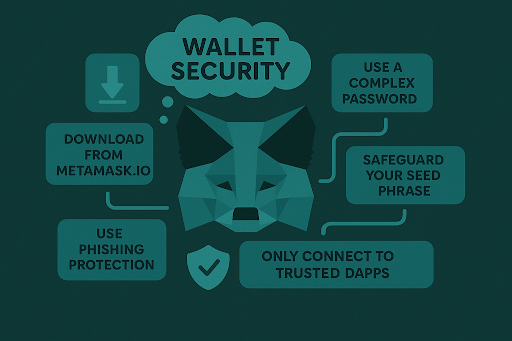
Advanced MetaMask Security Configuration
If you’re using MetaMask regularly, it’s worth adding a security hardening layer. Simple steps that dramatically reduce risk without sacrificing usability.
Essential Security Settings
Enable these immediately:
Settings → Security & Privacy → Phishing Detection: This feature automatically blocks known malicious sites. Should already be on, but verify.
Settings → Security & Privacy → Show Incoming Transactions: Displays incoming transactions so you're aware of unexpected activity.
Settings → Advanced → Show Hex Data: Lets you see raw transaction data. Most users won't read hex, but it's there if you need to verify something suspicious.
Settings → Advanced → Customize Transaction Nonce: Prevents replay attacks by letting you control transaction sequencing.
Settings → Advanced → Enable Improved Token Detection: Automatically detects legitimate tokens and warns about potential scam tokens.
Auto-lock settings:
Settings → Security & Privacy → Auto-Lock Timer: Set this to a maximum of 5-10 minutes. If you walk away from your computer with MetaMask unlocked, anyone with physical access can drain your wallet.
Password hygiene:
Use a 20+ character password generated by a password manager. Never reuse your MetaMask password elsewhere. If you suspect compromise, change it immediately. Your password encrypts your local key storage. Weak passwords can be brute-forced if someone gets access to your computer.
Privacy settings:
Settings → Privacy → Clear Activity and Nonce Data: Periodically clear this to remove transaction history from your local storage.
Consider using custom RPC endpoints: By default, MetaMask uses Infura (owned by ConsenSys). This means Infura sees your IP address and transaction requests. If you want more privacy, connect to your own Ethereum node or use a third-party RPC. Advanced users only.
Set Up a Hardware Wallet (and Actually Use It)
No single upgrade improves security more than connecting a hardware wallet to MetaMask. It shifts your private keys off your computer and into a secure chip that can’t be exported even if your system is compromised.
MetaMask supports Ledger and Trezor, as well as other hardware wallets. Once connected, transactions must be physically confirmed on the device, which prevents silent wallet drains or hidden approvals.
Clean Up Token Approvals
Old DeFi approvals pile up over time, and each one is a live wire. A contract you gave permission to six months ago might get exploited tomorrow. That access doesn’t expire unless you revoke it.
Tools like Revoke.cash, Debank, and Etherscan’s token approval page let you inspect and revoke allowances.
Set a calendar reminder to do this monthly. You’ll be surprised by how many forgotten approvals you’ve made.
Use Multiple MetaMask Accounts Strategically
MetaMask supports multiple accounts under one seed phrase. Use this to your advantage:
Account 1: Public wallet for minting, connecting to new dApps
Account 2: Staking and long-term DeFi positions
Account 3: Storage for stablecoins or NFTs
If one account gets phished or compromised, the others aren’t immediately exposed. This won’t save you from seed phrase theft, but it absolutely helps with contract-based exploits.
The Final Verdict: MetaMask Is Safe (But You're the Security Perimeter)
We've been saying the same thing throughout this entire guide: MetaMask, the software, is secure. The problem is never the wallet. It's always user error.
You approve malicious contracts. You enter seed phrases on phishing sites. You click confirm without reading. The wallet just executes what you tell it to.
That's self-custody. You control your funds, which means you're responsible for protecting them. No one's coming to save you if you mess up.
Use hardware wallets for serious money. Review every approval. Bookmark your dApps. Never share your seed phrase. Do those things, and MetaMask works perfectly.
Ignore them, and you'll eventually get drained. Simple as that.
Learning Crypto helps you stay ahead
Ask our Crypto AI about specific threats. Track your portfolio across networks. Get security insights from people who've survived multiple market cycles. See what our team is actually holding and why. The crypto environment changes constantly. We help you keep up.
FAQs
Can MetaMask be hacked?
MetaMask itself has strong security and hasn't been "hacked" in terms of attackers breaking the wallet's code. What people call "MetaMask hacks" are almost always users being tricked into approving malicious transactions or revealing their seed phrases.
Is MetaMask mobile safer than the browser extension?
The mobile app has some advantages (sandboxed environment and biometric locks) but also disadvantages (a smaller screen makes address verification more challenging). Both are secure if used properly.
What happens to my MetaMask if ConsenSys shuts down?
Nothing. Your wallet keeps working. MetaMask is open-source software that runs locally on your device. Even if ConsenSys disappeared tomorrow, you'd still have access to your funds through your seed phrase. You could restore your wallet in any BIP-39 compatible wallet.
What's the difference between MetaMask and Coinbase Wallet?
MetaMask is open-source and developed by ConsenSys. Coinbase Wallet is a closed-source application developed by Coinbase. Both are non-custodial. MetaMask has better dApp compatibility and more advanced features. Coinbase Wallet has a simpler interface and built-in fiat on-ramps through Coinbase. For security, they're roughly equivalent; both are solid hot wallets.
Disclaimer: This article is for educational purposes only and does not constitute financial advice. Cryptocurrency investments carry risk; you should always do your own research before making any investment decisions.

Cryptocurrency Education
Made Easy
Cryptocurrency Education
Made Easy
Cryptocurrency Education
Made Easy
Secure your edge: Get Crypto Made Easy PDF + weekly insights—free today.
No spam, unsubscribe at any time. By subscribing, you agree to our Privacy Policy. Need to unsubscribe? Unsubscribe from newsletter.
Disclaimer: This article is for educational purposes only and does not constitute financial advice. Cryptocurrency investments carry risk; you should always do your own research before making any investment decisions.